Member

 Forsythe
BBCode Requests Master List
(MCodes for Mahz, since it's not bbcode any more.)
Sidenote for Mahz: if there's any way we could help with MCodes, please say so.
Unimplemented/Requested bbcodes That We Want to Become MCodes:
[size]
[size=int x] X specifies a text size (in percentage? by an arbitrary number system? It's up to you!). I'd also request that, either way, decimal sizes are acceptable, just for the hilariousness of 3.1, 0.0002, or 5000.1 sized font.
[color]
[color=x]
...x="random" : displays a random color
...x="background" or x="invisible" : displays forum background color
...x="random" : displays a random color
...x="background" or x="invisible" : displays forum background color
[font]
[font=String x]Displays the text in the font specified by x if user has font installed. Defaults to Times New Roman, or Georgia. I like Georgia (be different, choose Georgia!). Should default to a different font than forum default, so that way at least users know that something happened.
[left]
Displays text so that it's left-aligned.
[justify]
Displays text so that each line takes up an entire post-width by messing with the number of spaces between words. I'm certain there's code floating around somewhere on how to make that happen.
[glow]
[glow=String color] Displays a glow around the text in a specified color. I'm not certain how it works, but it ends up looking like this: 
[glow=#hexhexhex] Functions identically to [glow=String color].
[glow=String color, short strength] Displays a glow around the text in a specified color at a specified strength. Strength affects both the size of the glow and how intense the glow color is.
[glow=#hexhexhex, short strength] Functions identically to [glow=String color, short strength].
[glow=#hexhexhex] Functions identically to [glow=String color].
[glow=String color, short strength] Displays a glow around the text in a specified color at a specified strength. Strength affects both the size of the glow and how intense the glow color is.
[glow=#hexhexhex, short strength] Functions identically to [glow=String color, short strength].
[bgcolour]
Functions identicially to [bgcolor].
[bgcolor] (possibly [highlight])
[bgcolor=String color] Changes the background color in a square around the selected text to the specified color. Useful for making pixel art, if so incliined.
[bgcolor=#hexhexhex] Functions identically to [bgcolor=String color].
[bgcolor=#hexhexhex] Functions identically to [bgcolor=String color].
[column] and [|]
(I've never seen this done before, but it would be fabulous!)
Divides the post into equally spaced columns. Inserts a new line before and after said columns.
Examples:
[column][|]This would be no different.[/|][/column]
[column][|]This is in column 1[/|][|]This is in column 2.[/|][/column]
Divides the post into equally spaced columns. Inserts a new line before and after said columns.
Examples:
[column][|]This would be no different.[/|][/column]
[column][|]This is in column 1[/|][|]This is in column 2.[/|][/column]
[table], [tr], and [td]
[table] is simply for parsing purposes. It indicates the start and end of a table.
[tr] creates a new row for the table.
[td] creates a new cell (or column, if you want to look at it that way) for the table. This can result in asymetrical tables.
Example:
[table][tr][tc]Row 1, Col 1[/tc][tc]Row 1, Col 2[/tc][/tr][tr][tc]Row 2, Col 1[/tc][tc]Row 2, Col 2[/tc][tc]Row 2, Col 3[/tc][/tr][/table] Would create a 2 row by 3 column table with cell r1,c3 left blank.
[tr] creates a new row for the table.
[td] creates a new cell (or column, if you want to look at it that way) for the table. This can result in asymetrical tables.
Example:
[table][tr][tc]Row 1, Col 1[/tc][tc]Row 1, Col 2[/tc][/tr][tr][tc]Row 2, Col 1[/tc][tc]Row 2, Col 2[/tc][tc]Row 2, Col 3[/tc][/tr][/table] Would create a 2 row by 3 column table with cell r1,c3 left blank.
[float]
Easier to demonstrate with a picture.
[float] Floats text to the right of an image.
[float=short x]
...x=0: Floats text to the right.
...x=1: Floats text to the left.
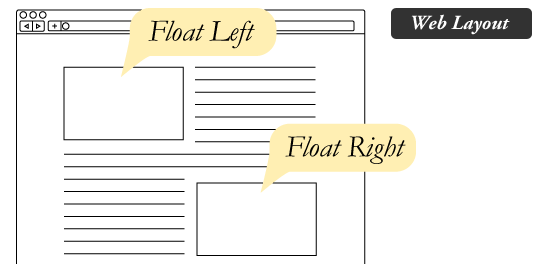
[float] Floats text to the right of an image.
[float=short x]
...x=0: Floats text to the right.
...x=1: Floats text to the left.
[soundcloud] - links to soundcloud, much like youtube embeds youtube.
[roll=xdy] - random number generator for dicerolling/tabletop purposes. x = number of repeats, y = number of sides
Bugs in the current BBCode System:
-Can't change the color of text inside hiders
-[url] overrides [code]
-[hr ] overrides [code]
-[indent] inside [sub] does this:
does this: d oes this: does this: does this: does this: does this : does this: d oes th is: does t his: does this: does this: doe s this: does this: does this: does this: does t his: s this: does this: does this: does this: does this: does this: does this : does this: does this: do es this: does this: does this: does this: does this: does this: does this: does this:
-@ mentions don't work when editing
-is it possible to center hiders but have the text inside not-centered?
Regarding the Text Editor:
Requests:
+More buttons for bbcode!
Bugs:
-Persistent color palettes on edit color then save without manually exiting the palette
Please suggest others if you think of them!