Hidden 12 mos ago Post by Mjolnir
Raw
Avatar of Mjolnir

Mjolnir sʟᴇᴇᴘ ᴘᴀʀᴀʟʏsɪs ᴅᴇᴍᴏɴ

Member Seen 34 min ago

It looks like in tables now, that items within cells are vertically aligning center rather than fixed to the top. So that's throwing off some of my coding.
Hidden 12 mos ago Post by Mahz
Raw
OP
Avatar of Mahz

Mahz ¯\_(ツ)_/¯

Admin Seen 9 mos ago

@Exit Tell me if it's crap. I used your table example above on the development server as a test case.

But your advanced bbcode might rely on bits of the original table behavior that I may have to add back individually.
Hidden 12 mos ago 12 mos ago Post by Mahz
Raw
OP
Avatar of Mahz

Mahz ¯\_(ツ)_/¯

Admin Seen 9 mos ago

It looks like in tables now, that items within cells are vertically aligning center rather than fixed to the top. So that's throwing off some of my coding.


Oh thanks, I see the problem. Gimme 5 min. Edit: Done
1x Thank Thank
Hidden 12 mos ago Post by Exit
Raw
Avatar of Exit

Exit ✁- - - - - - -

Member Online

I'm pasting the exact same code used earlier to visually see the difference.

fig.1 Table w/ Border.

fig.2 Table w/o Border.
Hidden 12 mos ago Post by Mjolnir
Raw
Avatar of Mjolnir

Mjolnir sʟᴇᴇᴘ ᴘᴀʀᴀʟʏsɪs ᴅᴇᴍᴏɴ

Member Seen 34 min ago

<Snipped quote by Mjolnir>

Oh thanks, I see the problem. Gimme 5 min. Edit: Done


Thanks so much! That looks like it fixed my tables :) I appreciate it!
Hidden 12 mos ago 12 mos ago Post by Mahz
Raw
OP
Avatar of Mahz

Mahz ¯\_(ツ)_/¯

Admin Seen 9 mos ago

@Exit I see, so there's a regression now in the:

>BOLD edit: Text in a cell following the cell with the nested table will start from the bottom.

Now all cell content is anchored at the top.

This is because the first table row (thead) had special behavior like bold text and bottom alignment (instead of top alignment like the rest of the table). This behavior went away when I stopped special-casing the first table row.
1x Thank Thank
Hidden 12 mos ago Post by Exit
Raw
Avatar of Exit

Exit ✁- - - - - - -

Member Online

@Exit I see, so there's a regression now in the:

>BOLD edit: Text in a cell following the cell with the nested table will start from the bottom.

Now all cell content is anchored at the top.

This is because the first table row (thead) had special behavior like bold text and bottom alignment (instead of top alignment like the rest of the table). This behavior went away when I stopped special-casing the first table row.

I could cry it's so pretty.

And I assumed fixing the code would ruin some of the tables I've made that made use of weird code behavior, but I think overall I'd rather have the tables working more or less 'as intended' than trying to make use of broken things.

I'm off to play with my new toy. I'll let you know if anything else needs to be fixed but I think that was probably the number one thing I wanted changed to the bbcode. And not because it was making me lose my mind contrary to popular belief.
OMFGIWAITEDYEARSFORTHISIMLOCKINGMYSELFINMYTESTTHREADGOODBYE
1x Laugh Laugh
Hidden 12 mos ago Post by BrokenPromise
Raw
Avatar of BrokenPromise

BrokenPromise With Rightious Hands

Member Seen 19 min ago

@Mahz It looks like old tables made before the update still have a horizontal scroll. Though it looks like new ones no longer have it. Is that possible?

Also, it looks like the text in @Exit's newest example is flowing off the side of the page with no way to read it. If I turn my phone sideways I can read it all just fine, however. I do not use my phone often for forum viewing, but this feels like a good compromise to me.

I'll have to re-upload some of my older projects to see how they look.

Hidden 12 mos ago Post by Mahz
Raw
OP
Avatar of Mahz

Mahz ¯\_(ツ)_/¯

Admin Seen 9 mos ago

@BrokenPromise When you save a post, it also saves the html that your bbcode generated to the database so that I don't break old posts if I ever change the bbcode output.

So it's intended behavior.

As for text floating off the side of the screen, that is the trade-off of removing horizontal scroll.

I'd need feedback from mobile users to figure out what the right trade-off is.
1x Like Like
Hidden 12 mos ago Post by BrokenPromise
Raw
Avatar of BrokenPromise

BrokenPromise With Rightious Hands

Member Seen 19 min ago

@Mahz Ah, it makes sense now.

The little reply shortcut buttons that add BBC code to highlighted test are pretty nifty, even if I personally do most of my writing in a word processor most of the time. The font color tool is missing its tool tip on hover.
Hidden 12 mos ago Post by Mahz
Raw
OP
Avatar of Mahz

Mahz ¯\_(ツ)_/¯

Admin Seen 9 mos ago

@BrokenPromise Can you elaborate? Did the color picker color palette used to show something on hover?
Hidden 12 mos ago Post by BrokenPromise
Raw
Avatar of BrokenPromise

BrokenPromise With Rightious Hands

Member Seen 19 min ago

@Mahz Let me clarify.

All of the buttons have a little tool tip that shows up on hover, but the color picker does not. It's a small thing, and I thought you'd like to add a tool tip in for consistency. It's certainly not something I'd consider essential to "fix."
Hidden 12 mos ago Post by Mjolnir
Raw
Avatar of Mjolnir

Mjolnir sʟᴇᴇᴘ ᴘᴀʀᴀʟʏsɪs ᴅᴇᴍᴏɴ

Member Seen 34 min ago

Hey again, sorry lol.

So I was working on tables today and I noticed another weird bug. The more rows that are in a table it adds more space above and below the entire table. I had a paragraph above a table and the spacing was normal, but as I added more rows to the table that gap got larger.

From my experimenting it's nothing on my end.

Just wanted to let you know! Thanks :)
Hidden 12 mos ago Post by Lord Wraith
Raw
Avatar of Lord Wraith

Lord Wraith Thunderbringer

Member Seen 21 min ago

Hey again, sorry lol.

So I was working on tables today and I noticed another weird bug. The more rows that are in a table it adds more space above and below the entire table. I had a paragraph above a table and the spacing was normal, but as I added more rows to the table that gap got larger.

From my experimenting it's nothing on my end.

Just wanted to let you know! Thanks :)


This happens when you put a line break after the [/row].

[table][row][cell][/cell][/row]
[row][cell][/cell][/row][/table]

The above will keep creating the extra padding.

[table][row][cell][/cell][/row][row][cell][/cell][/row][/table]

The above will not.
Hidden 12 mos ago 12 mos ago Post by Mjolnir
Raw
Avatar of Mjolnir

Mjolnir sʟᴇᴇᴘ ᴘᴀʀᴀʟʏsɪs ᴅᴇᴍᴏɴ

Member Seen 34 min ago

@Lord Wraith Oh ok. I'll give that a try. Thanks!

(sorry edited it because the quoting got hella weird haha)

Edit: That worked! I appreciate it!
Hidden 12 mos ago Post by Mahz
Raw
OP
Avatar of Mahz

Mahz ¯\_(ツ)_/¯

Admin Seen 9 mos ago

@Mjolnir Yeah, the line break behavior is so annoying.

I think it's preserving every line break you make in bbcode, so the only way to avoid it is so put your bbcode on the same line. Awful

I think the solution is for me to tweak the bbcode system to ignore linebreaks between things like rows and cells and also ignore leading/trailing line breaks inside [cell] a [/cell].
1x Thank Thank
Hidden 12 mos ago Post by Mjolnir
Raw
Avatar of Mjolnir

Mjolnir sʟᴇᴇᴘ ᴘᴀʀᴀʟʏsɪs ᴅᴇᴍᴏɴ

Member Seen 34 min ago

@Mjolnir Yeah, the line break behavior is so annoying.

I think it's preserving every line break you make in bbcode, so the only way to avoid it is so put your bbcode on the same line. Awful

I think the solution is for me to tweak the bbcode system to ignore linebreaks between things like rows and cells and also ignore leading/trailing line breaks inside [cell] a [/cell].


BBcode is so fun xD lol At least it's not broken hahah I'll take what I can get lol

At least I can ctrl - F to find stuff in the mountain of code lol
Hidden 12 mos ago 12 mos ago Post by Exit
Raw
Avatar of Exit

Exit ✁- - - - - - -

Member Online

I want to apologize because the following will seem like a headache but I wanted to bring this up in case someone else wants to comment (although I think this mostly just affects me). There is an odd behavior happening with tables now that wasn't before. It could need a fix and probably should, but I don't want to be the only voice for people who like to mess with this stuff.

The following was my usual test thread rabbit hole, just cleaned up so you can see how I arrived where I did.


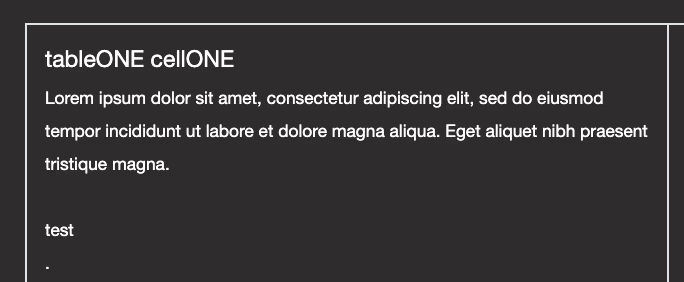
fig.1 Test of (1) triple nested tables, (2) custom cell configuration and (3) image manipulation beyond cell borders. Bordered to see boundaries.
tableONE cellONE
Lorem ipsum dolor sit amet, consectetur adipiscing elit, sed do eiusmod tempor incididunt ut labore et dolore magna aliqua. Eget aliquet nibh praesent tristique magna.
tableONE cellTWO

tableTWO cellONE
Lorem ipsum dolor sit amet, consectetur adipiscing elit, sed do eiusmod tempor incididunt ut labore et dolore magna aliqua. Eget aliquet nibh praesent tristique magna.
tableTWO cellTWO
tableTHREE cellTWO
Table"ONE" RowTWO CellONETable"ONE" RowTWO CellTWO

fig.2 Table behavior after the entire table was given a 'sub' tag. Word-wrapped text will stack on top of each other on the same line.

tableONE cellONE
Lorem ipsum dolor sit amet, consectetur adipiscing elit, sed do eiusmod tempor incididunt ut labore et dolore magna aliqua. Eget aliquet nibh praesent tristique magna.
tableONE cellTWO

tableTWO cellONE
Lorem ipsum dolor sit amet, consectetur adipiscing elit, sed do eiusmod tempor incididunt ut labore et dolore magna aliqua. Eget aliquet nibh praesent tristique magna.
tableTWO cellTWO
tableTHREE cellTWO
Table"ONE" RowTWO CellONETable"ONE" RowTWO CellTWO

fig.3 Same as above. Image removed. Testing if stacked words can be separated manually. Subbing contents again allows separation.

tableONE cellONE
Lorem ipsum dolor sit amet, consectetur adipiscing elit, sed do eiusmod tempor incididunt ut labore et dolore magna aliqua. Eget aliquet nibh praesent tristique magna.

test
.
.
.
.
.
.
.
.
.
.
test
.
.
.
.
.
.
.
.
.
.
test
tableONE cellTWO

tableTWO cellONE
Lorem ipsum dolor sit amet, consectetur adipiscing elit, sed do eiusmod tempor incididunt ut labore et dolore magna aliqua. Eget aliquet nibh praesent tristique magna.
tableTWO cellTWO
TableTHREE CellONEtableTHREE cellTWO
Table"ONE" RowTWO CellONETable"ONE" RowTWO CellTWO

fig.4 Removed 'sub' tag from table and nested a 'subbed' table into one of the cells, replicating Roach's timeline design without their code.

tableONE cellONE
________________________________
tableONE cellTWO

tableTWO cellONE
________________________________________________
tableTWO cellTWO
tableTHREE cellTWO
Table"ONE" RowTWO CellONE

.
.
.
.
.
.
.
.
.
.

.
.
.
.
.
.
.
.
.
.

.
.
.
.
.
.
.
.
.
.

.
.
.
.
.
.
.
.
.
.

.
.
.
.
.
.
.
.
.
.

.
.
.
.
.
.
.
.
.
.

.
.
.
.
.
.
.
.
.
.

.
.
.
.
.
.
.
.
.
.
█- So I guess there is an 'easier' way to replicate Roach's timeline.
.
.
.
.
.
.
.
.
.
.
- 'Easier' is relative. The code is easier to read but any
.
.
.
.
.
.
.
.
.
.
- adjusting is done by hand, just like everything else.
.
.
.
.
.
.
.
.
.
.

.
.
.
.
.
.
.
.
.
.

.
.
.
.
.
.
.
.
.
.

.
.
.
.
.
.
.
.
.
.

.
.
.
.
.
.
.
.
.
.

.
.
.
.
.
.
.
.
.
.

.
.
.
.
.
.
.
.
.
.

.
.
.
.
.
.
.
.
.
.

.
.
.
.
.
.
.
.
.
.

.
.
.
.
.
.
.
.
.
.

.
.
.
.
.
.
.
.
.
.


I guess I'm torn between wanting to fix this and leaving it as is. It can lead to some interesting opportunities, but I also think the only people really hoping to make use of the timeline code/custom border would be me and a few others and we already have an option. Plus, I'm not sure anyone has the patience to manually adjust every element of their table a couple of inches every time the table starts to act this way.

Before the changes, 'subbing' a table would, I guess, sub everything inside including the space between lines of text. I'm not sure how else to explain it and I don't know if I have an example to share. It sometimes led to nice looking bodies of text instead of small text on lines that were awkwardly spaced out. I am okay with returning to this if possible.

The second issue is probably much easier to fix and maybe more widely accepted. Bordering a table will border all tables within it, whether or not I want those tables bordered too. I don't know if this can be changed to allow the borders to be turned on independently of each other.

Again, sorry for the headache but I really really appreciate the changes being made to the code. They've been great so far.


EDIT:
▇▇▇▇▇▇▇
.
.
.
.
.
.
.
.
.
▇▇▇▇▇
.
.
.
.
.
.
.
.
.
▇▇▇▇▇▇▇
.
.
.
.
.
.
.
.
.
▇▇▇▇▇▇
. /
. _
.
.
.
.
.
. _
.
▇▇▇▇ rodent ▇▇▇▇ cheese !
.
.
.
.
.
.
.
.
.
▇▇▇▇▇▇
. \
.
.
.
.
.
.
.
.
▇▇▇▇▇▇▇
.
.
.
.
.
.
.
.
.
▇▇▇▇▇
.
.
.
.
.
.
.
.
.
▇▇▇▇▇▇▇
So I just made this with the rules as they are now. Maybe just ignore me.
Hidden 12 mos ago Post by Mahz
Raw
OP
Avatar of Mahz

Mahz ¯\_(ツ)_/¯

Admin Seen 9 mos ago

@Exit I think you are the only person we're gonna get here that can give me this sort of feedback.

Ok, I see the cause of the regression in some behavior.

1. Looks like the old table specified a line-height for table cells. If I add it, the subbed text stops wrapping over itself:


2. I will also update the bordered-table code so that it only applies to its direct child cells instead of all descendent cells.

Thanks.

Is that new image behavior? And did I miss any other new behavior in your post that might need to be fixed?
1x Thank Thank
Hidden 12 mos ago 12 mos ago Post by Exit
Raw
Avatar of Exit

Exit ✁- - - - - - -

Member Online

The image is doing what its always done as far as I can tell. Pushing it outside the cell boundary allows me to attach images to each other for image wrapping or for trying neat little visual tricks.

And definitely push the border change through but maybe hold off on the sub-table issue? I don't know. I like the ability I've been given to turn a table into a drawing tablet. You can literally make pixel art with it now. Which you could technically before but it was a headache. This is more fun.
↑ Top
© 2007-2026
BBCode Cheatsheet